
You have a Microsoft 365 E5 subscription. The subscription contains users that have the following types of devices:
• Windows 10
• Android
• iOS
To which devices can you apply Endpoint DLP policies?
Correct Answer:
A
🗳️
HOTSPOT
-
Your company has an office in London.
You have a Microsoft 365 subscription.
You need to create a Conditional Access policy named Policy that meets the following requirements:
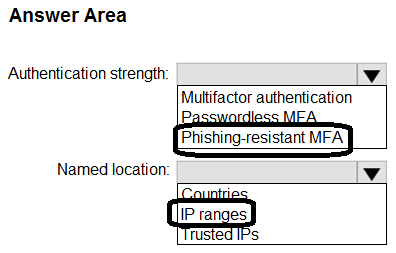
• Only FIDO2 security keys, Windows Hello for Business, and certificates must be supported for authentication.
• The London office must be marked as a trusted location and excluded from Policy1.
How should you configure Policy1? To answer, select the appropriate options in the answer area.
NOTE: Each correct selection is worth one point.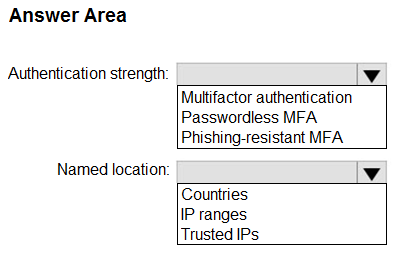
Correct Answer:
HOTSPOT
-
You have a Microsoft 365 E5 subscription.
You plan to use Microsoft Graph PowerShell to perform the following tasks:
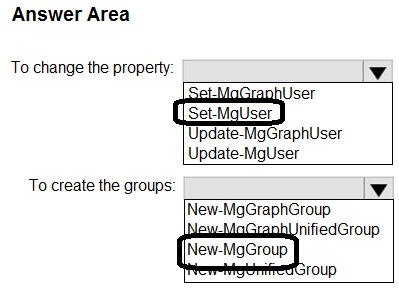
• Change the Company name property for all users.
• Create new Microsoft 365 groups.
Which PowerShell cmdlet should you run? To answer, select the appropriate options in the answer area.
NOTE: Each correct selection is worth one point.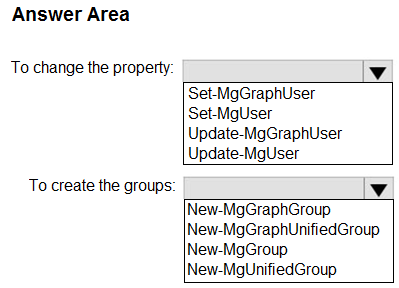
Correct Answer:
You have a Microsoft 365 E5 subscription.
You plan to use a third-party protection service to scan email messages before they are delivered to Microsoft 365.
You configure a mail flow rule to bypass spam filtering for incoming messages.
Which two messages will still be scanned by Microsoft 365 and cannot be bypassed by the mail flow rule? Each correct answer presents part of the solution.
NOTE: Each correct selection is worth one point.
Correct Answer:
AB
🗳️
You have a Microsoft 365 E5 subscription.
Administrators are issued FIDO2 security keys.
You need to create a Conditional Access policy that will use a FIDO2 security key as an authentication method.
Which Access controls option should you select for the policy?
Correct Answer:
D
🗳️
You have a Microsoft 365 E5 subscription and use Microsoft Defender for Office 365.
You need to implement a social engineering awareness solution that meets the following requirements:
• To reset a user’s password, emulate an email message that contains a link.
• Track any user that selects the email message link.
• Suggest further social engineering training.
What should you use in the Microsoft Defender portal?
Correct Answer:
A
🗳️
HOTSPOT
-
You have a Microsoft 365 subscription.
You integrate Microsoft Defender for Cloud Apps with Microsoft Defender for Endpoint.
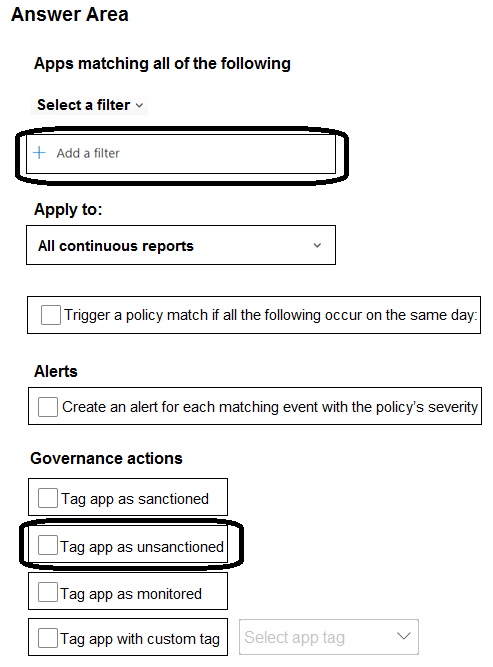
You need to create a policy to block users from accessing discovered apps that have a risk score of 4 or lower.
Which two settings should you configure? To answer, select the appropriate settings in the answer area.
NOTE: Each correct selection is worth one point.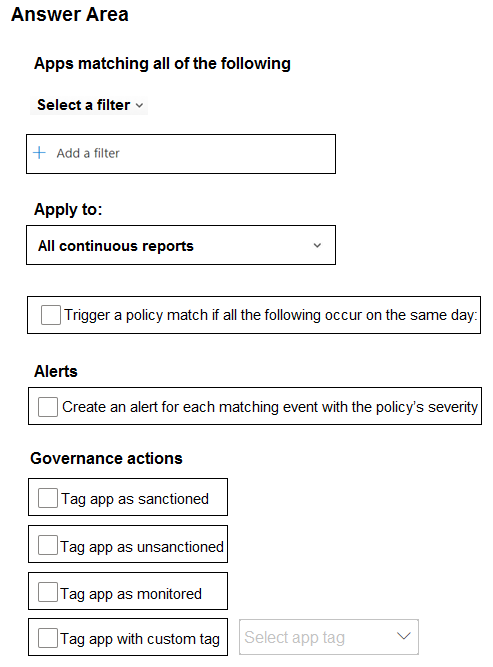
Correct Answer:
You have a Microsoft 365 E5 subscription that includes Microsoft Intune.
You manage all iOS devices by using Intune.
You plan to protect corporate-owned iOS devices by using Microsoft Defender for Endpoint. You configure a connection between Intune and Defender for Endpoint.
You need to onboard the devices to Defender for Endpoint.
What should you do?
Correct Answer:
D
🗳️
You have a Microsoft 365 E5 subscription and use Microsoft Defender for Cloud Apps.
You register a cloud app named App1 in Microsoft Entra ID.
You need to create an access policy for App1.
What should you do first?
Correct Answer:
D
🗳️
You have a Microsoft 365 E5 subscription and use Microsoft Defender for Cloud Apps.
From Policy management, you open Information protection as shown in the following exhibit.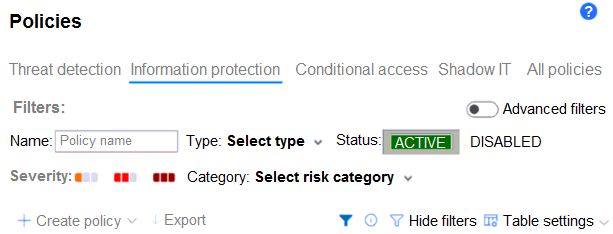
Which type of policy can you create?
Correct Answer:
E
🗳️
 Viewing page 32 out of 39 pages.

By buying Contributor Access for yourself, you will gain the following features:


 1 Month 2.58 / day
All Questions for 1 Exam
Inline Discussions
No Captcha / Robot Checks
Includes New Updates
1 Month 2.58 / day
All Questions for 1 Exam
Inline Discussions
No Captcha / Robot Checks
Includes New Updates
 3 Months 1.76 / day
All Questions for 1 Exam
Inline Discussions
No Captcha / Robot Checks
Includes New Updates
3 Months 1.76 / day
All Questions for 1 Exam
Inline Discussions
No Captcha / Robot Checks
Includes New Updates
