
HOTSPOT
-
You have an Azure AD tenant that contains the users shown in the following table.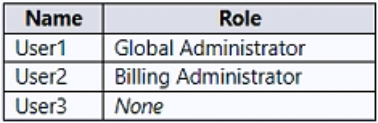
You enable self-service password reset for all users. You set Number of methods required to reset to 1, and you set Methods available to users to Security questions only.
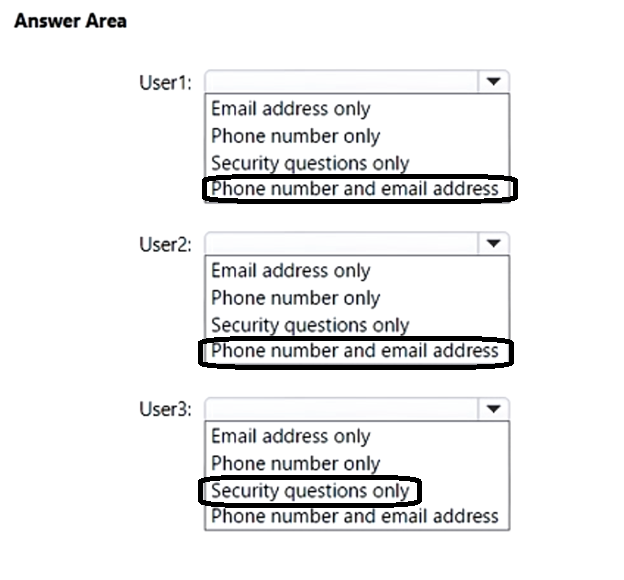
What information must be configured for each user before the user can perform a self-service password reset? To answer, select the appropriate options in the answer area.
NOTE: Each correct selection is worth one point.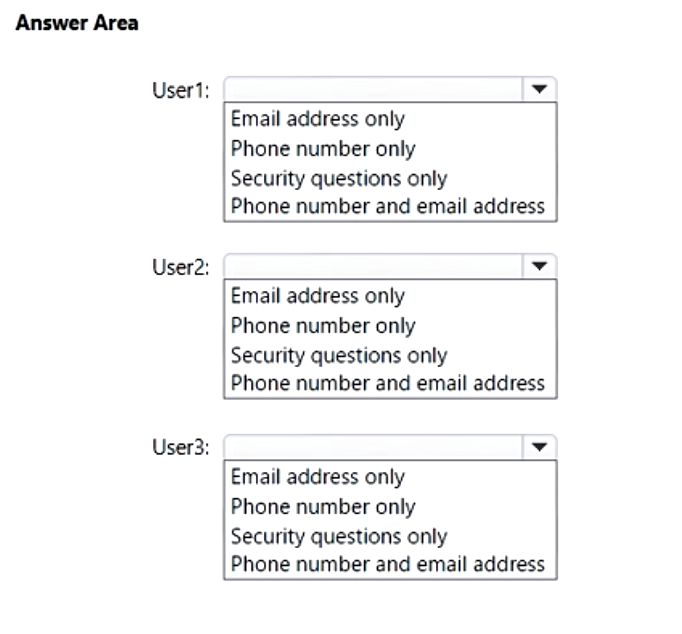
Correct Answer:
Your on-premises network contains an Active Directory domain.
You have a Microsoft 365 E5 subscription.
You plan to implement a hybrid configuration that has the following requirements:
• Minimizes the number of times users are prompted for credentials when they access Microsoft 365 resources
• Supports the use of Azure AD Identity Protection
You need to configure Azure AD Connect to support the planned implementation.
Which two options should you select? Each correct answer presents part of the solution.
NOTE: Each correct selection is worth one point.
Correct Answer:
AD
🗳️
HOTSPOT
-
Your network contains an Active Directory domain and an Azure AD tenant.
You implement directory synchronization for all 10,000 users in the organization.
You automate the creation of 100 new user accounts.
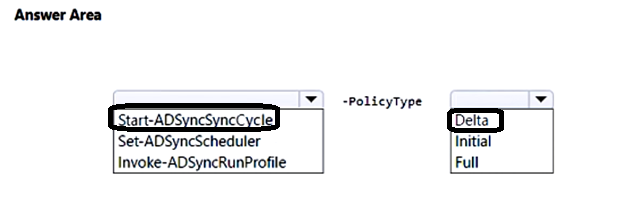
You need to ensure that the new user accounts synchronize to Azure AD as quickly as possible.
Which command should you run? To answer, select the appropriate options in the answer area.
NOTE: Each correct selection is worth one point.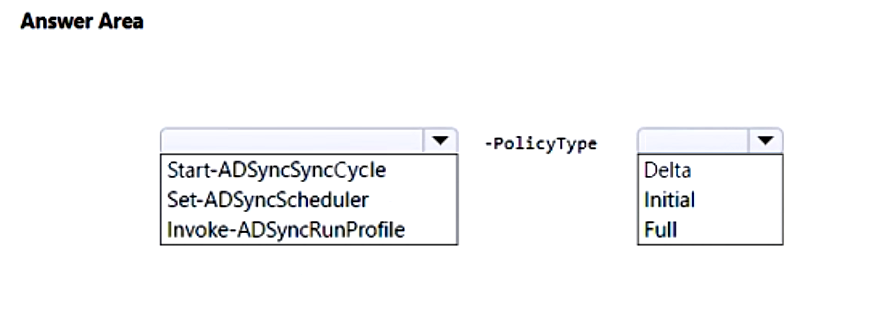
Correct Answer:
HOTSPOT
-
You have a Microsoft 365 E5 subscription that contains the users shown in the following table.
Each user has a device with the Microsoft Authenticator app installed.
From Microsoft Authenticator settings for the subscription, the Enable and Target settings are configured as shown in the exhibit. (Click the Exhibit tab.)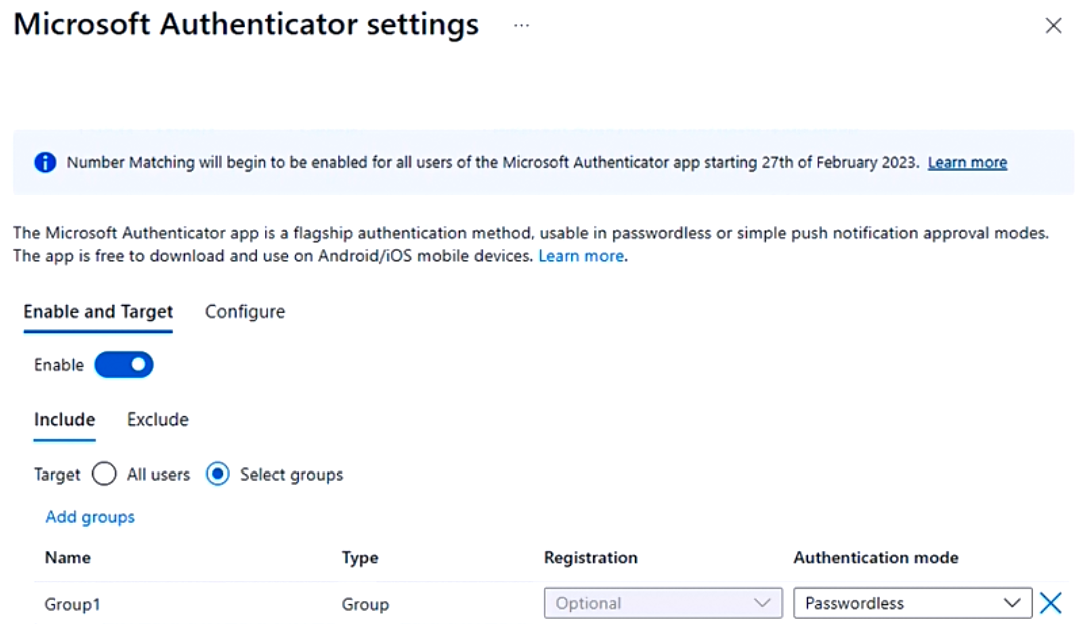
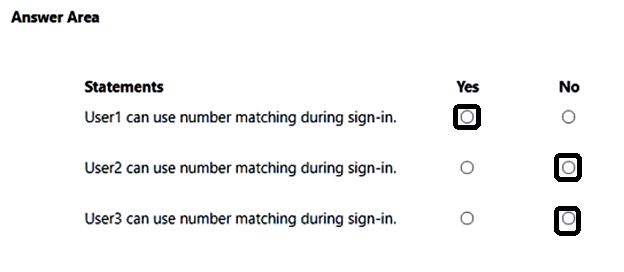
For each of the following statements, select Yes if the statement is true. Otherwise, select No.
NOTE: Each correct selection is worth one point.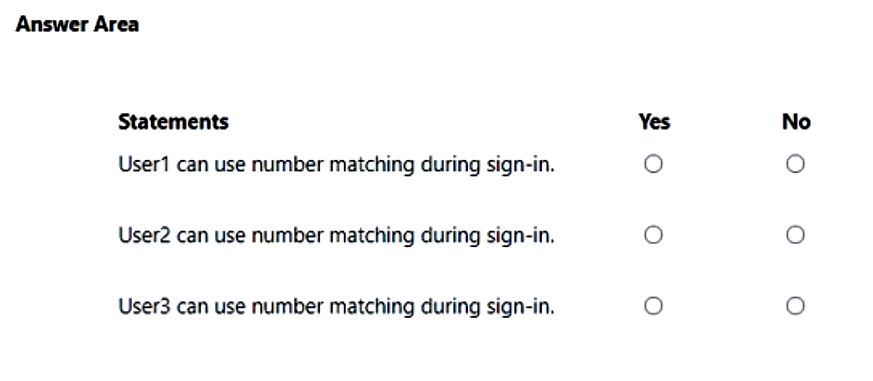
Correct Answer:
HOTSPOT
-
Overview
-
Litware, Inc. is a consulting company that has a main office in Montreal and a branch office in Seattle.
Litware collaborates with a third-party company named A. Datum Corporation.
Environment
-
On-Premises Environment
-
The network of Litware contains an Active Directory domain named litware.com. The domain contains three organizational units (OUs) named LitwareAdmins, Montreal Users, and Seattle Users and the users shown in the following table.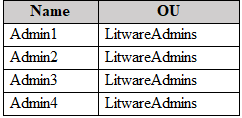
The domain contains 2,000 Windows 10 Pro devices and 100 servers that run Windows Server 2019.
Cloud Environment
-
Litware has a pilot Microsoft 365 subscription that includes Microsoft Office 365 Enterprise E3 licenses and Azure AD Premium P2 licenses.
The subscription contains a verified DNS domain named litware.com.
Azure AD Connect is installed and has the following configurations:
• Password hash synchronization is enabled.
• Synchronization is enabled for the LitwareAdmins OU only.
Users are assigned the roles shown in the following table.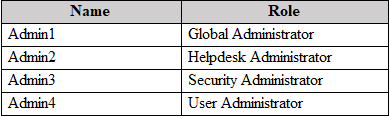
Self-service password reset (SSPR) is enabled.
The Azure AD tenant has Security defaults enabled.
Problem Statements
-
Litware identifies the following issues:
• Admin1 cannot create conditional access policies.
• Admin4 receives an error when attempting to use SSPR.
• Users access new Office 365 service and feature updates before the updates are reviewed by Admin2.
Requirements
-
Planned Changes
-
Litware plans to implement the following changes:
• Implement Microsoft Intune.
• Implement Microsoft Teams.
• Implement Microsoft Defender for Office 365.
• Ensure that users can install Office 365 apps on their device.
• Convert all the Windows 10 Pro devices to Windows 10 Enterprise ES.
• Configure Azure AD Connect to sync the Montreal Users OU and the Seattle Users OU.
Technical Requirements
-
Litware identifies the following technical requirements:
• Administrators must be able to specify which version of an Office 365 desktop app will be available to users and to roll back to previous versions.
• Only Admin2 must have access to new Office 365 service and feature updates before they are released to the company.
• Litware users must be able to invite A. Datum users to participate in the following activities:
• Join Microsoft Teams channels.
• Join Microsoft Teams chats.
• Access shared files.
• Just in time access to critical administrative roles must be required.
• Microsoft 365 incidents and advisories must be reviewed monthly.
• Office 365 service status notifications must be sent to Admin2.
• The principle of least privilege must be used.
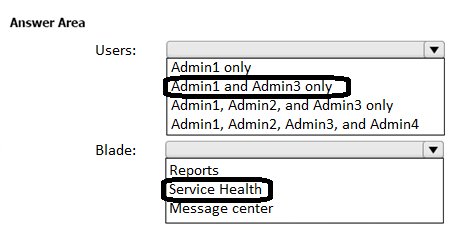
You need to ensure that the Microsoft 365 incidents and advisories are reviewed monthly.
Which users can review the incidents and advisories, and which blade should the users use? To answer, select the appropriate options in the answer area.
NOTE: Each correct selection is worth one point.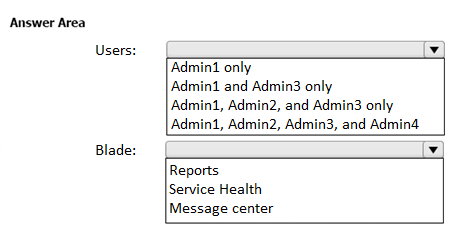
Correct Answer:
You have a Microsoft 365 tenant that contains a Windows 10 device. The device is onboarded to Microsoft Defender for Endpoint.
From Microsoft 365 Defender portal, you perform a security investigation.
You need to run a PowerShell script on the device to collect forensic information.
Which action should you select on the device page?
Correct Answer:
C
🗳️
HOTSPOT
-
You configure an anti-phishing policy as shown in the following exhibit.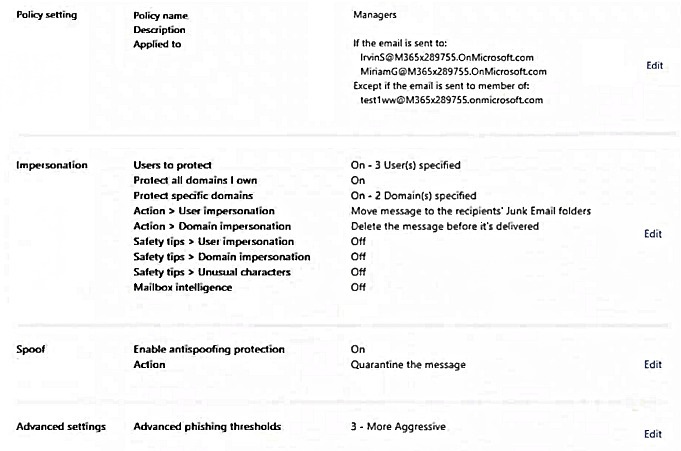
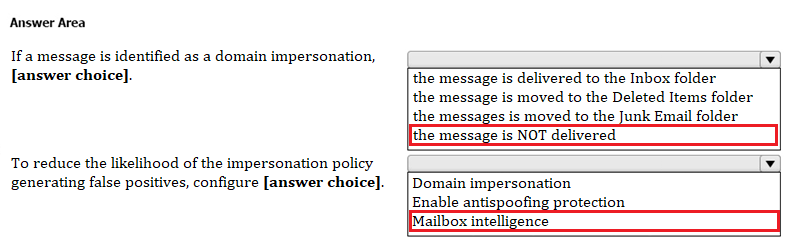
Use the drop-down menus to select the answer choice that completes each statement based on the information presented in the graphic.
NOTE: Each correct selection is worth one point.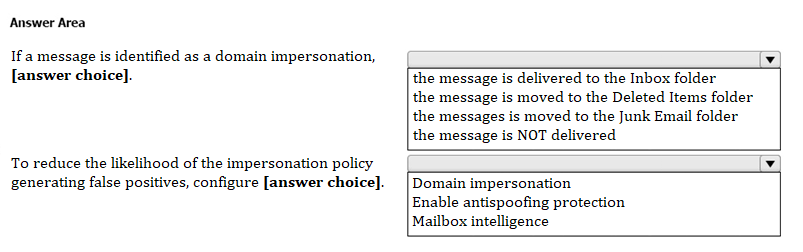
Correct Answer:
You have a Microsoft 365 subscription that uses Microsoft Defender for Office 365.
You notice that it takes several days to notify email recipients when an incoming email message is marked as spam, and then quarantined.
You need to ensure that the email recipients are notified within 24 hours.
What should you do?
Correct Answer:
D
🗳️
You have a Microsoft 365 E5 subscription.
You need to ensure that administrators receive an email when Microsoft 365 Defender detects a sign-in from a risky IP address.
What should you create?
Correct Answer:
B
🗳️
You have a Microsoft 365 E5 subscription that has Microsoft Defender for Endpoint integrated with Microsoft Intune.
Devices are onboarded by using Microsoft Defender for Endpoint.
You plan to block devices based on the results of the machine risk score calculated by Microsoft Defender for Endpoint.
What should you create first?
Correct Answer:
B
🗳️
 Viewing page 18 out of 39 pages.

By buying Contributor Access for yourself, you will gain the following features:


 1 Month 2.58 / day
All Questions for 1 Exam
Inline Discussions
No Captcha / Robot Checks
Includes New Updates
1 Month 2.58 / day
All Questions for 1 Exam
Inline Discussions
No Captcha / Robot Checks
Includes New Updates
 3 Months 1.76 / day
All Questions for 1 Exam
Inline Discussions
No Captcha / Robot Checks
Includes New Updates
3 Months 1.76 / day
All Questions for 1 Exam
Inline Discussions
No Captcha / Robot Checks
Includes New Updates
